Building a document in the editor
Build a template in the browser without writing code. What you make here and the JSON you post to the API are the same document model, so what you place on screen is the schema — you can inspect it, and edit it by hand, in the JSON tab at any time.
Read this in screen order. To actually build one, pick a document type under "Step by step" below.
{
  "template": { "…": "…" },
  "data": {
    "title": "Invoice",
    "items": [
      { "name": "Brand design", "amount": 2400 }
    ]
  }
}
The screen
The screen has three parts: the object tree on the left, the canvas in the middle, and the properties panel on the right. The canvas holds the page at real size. The floating bar near the bottom is where you add objects. Those three names are used throughout this document.
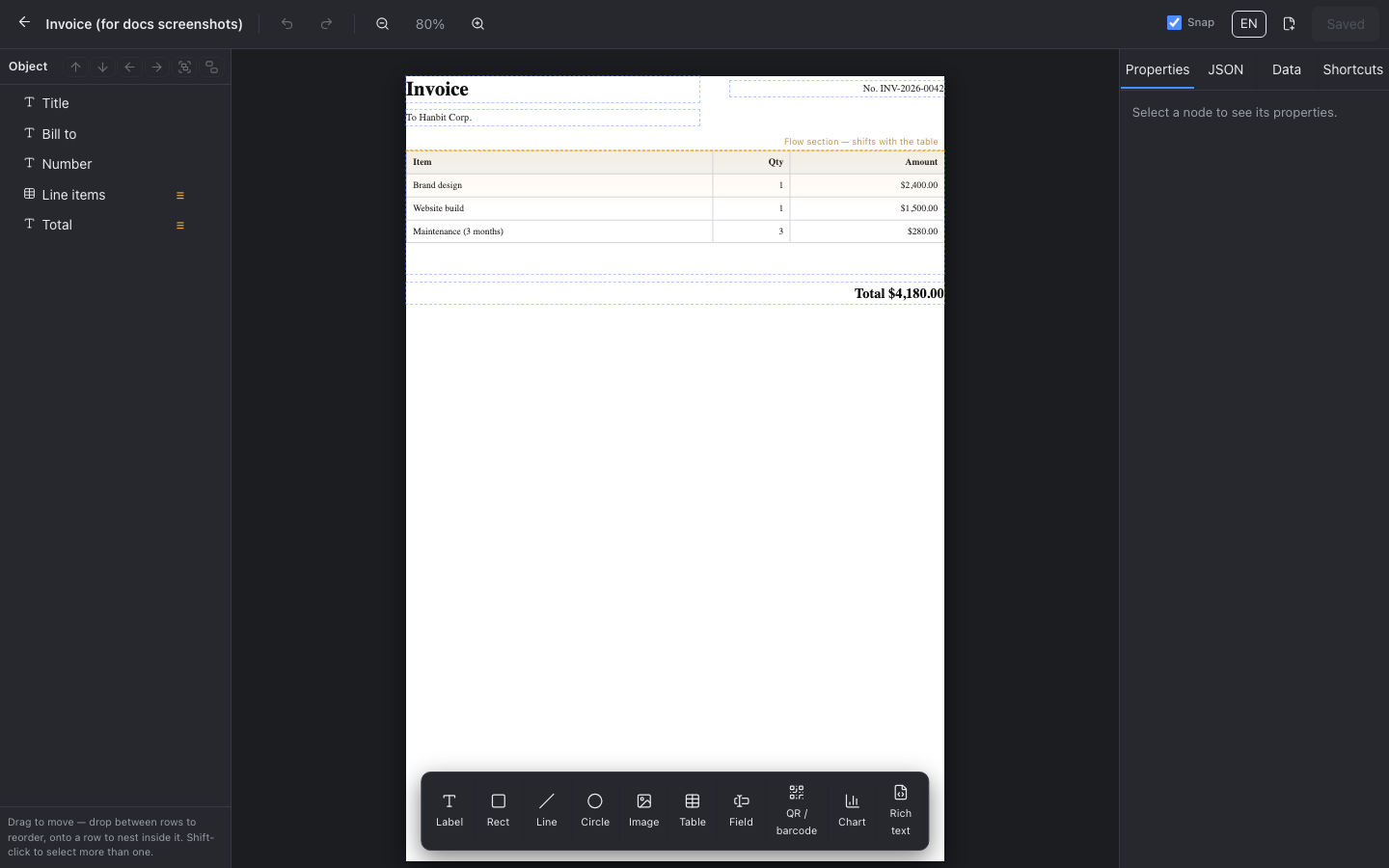
The canvas is not a picture — it is the real render. Change a value and it redraws in place, so you see wrapping and overflow without producing a PDF.
The top bar sets the zoom and turns the ruler, the grid and snapping on and off. It also shows whether you have unsaved work — the save button wakes up as soon as you change something. The ruler starts at zero inside the margin, at the same place the X and Y in the properties panel count from — not at the corner of the paper. The grid spacing follows the zoom and always lines up with the numbered ticks. The grid is a visual aid only — objects do not snap to it. Snapping works off other objects and the paper edges, not the grid. Neither the ruler nor the grid is saved: reload the page and both start off again.
Page settings — paper, margins, header, footer
Paper size, orientation, margins, header and footer belong to the document, not to any object, so the panel for them is always on the right — you do not have to select anything first. Change the paper and the canvas resizes in place; the ruler and the grid follow.
Four papers are available: A4 (794×1123), A5 (559×794), Letter (816×1056) and Legal (816×1344), each in portrait or landscape. The numbers are px at 96 dpi, and the selector shows them so you can compare sizes without looking them up.
The margin is not decoration — it is where object coordinates start counting from. The X and Y in the properties panel are measured from inside it, so changing a margin moves every object with it. Header and footer take {{ data.x }} like any other text, plus [[page]] and [[pages]] for page numbers.
Over the API the same settings live in page: {"size":"letter","orientation":"landscape"}. A value outside the list is rejected with an error naming the field — it is not quietly corrected, because a corrected page size would print a document you did not ask for.
Adding objects
Press a button in the tool bar and an object is placed at the top left of the paper. Each one is nudged slightly so repeated presses do not stack on top of each other.
There are ten kinds. You cannot change the kind afterwards, so if you added the wrong one, delete it and add the right one.
- Label
label - Image
image - Line
line - Rect
rect - Circle
circle - Table
table - Chart
chart - QR / barcode
code - Rich text
html - Field
field
A new object is always made visible: shapes come with a border, tables with grid lines and a header row, a QR code with a working default address. Nobody should ever add something and see nothing.
Selecting, moving, resizing
Click on the canvas to select. Shift-click to select more than one. Eight handles appear around the selection; drag one to resize.
While you drag, guides appear and the object snaps when it lines up with another object or a page edge. For exact placement, turn snapping off in the top bar or type the numbers into X and Y in the properties panel.
Arrow keys move by 1px, including several objects at once. Use bring to front and send to back in the properties panel to change what is drawn on top.
Box alignment at the bottom of the panel aligns the selection against the page (or its parent). With several selected it aligns them within the box they form — someone who selects three things and presses align left wants those three aligned, not all three shoved against the edge of the paper.
The object tree
The list on the left is the structure of the document. Indentation is the parent-child relationship, and the top-to-bottom order decides what is drawn on top when things overlap.
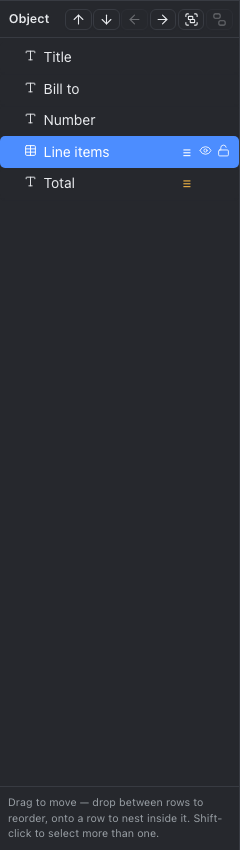
Drag a row to reorder. Drop between rows to change the order; drop onto a row to move inside it. Dragging a multiple selection moves all of them, and if you selected both a parent and its child only the parent moves — the child travels with it anyway.
Double-click a row to rename it. The name is for you; it never appears in the PDF.
The eye icon hides an object. A hidden object is left out of the PDF as well, not just the editing screen — something missing on screen but present in the output is the worse surprise. If you want data to decide whether it appears, use "show when" in the properties panel instead of hiding it.
The padlock locks an object. A locked object cannot be clicked, moved or deleted, and its properties panel is disabled as a whole. Locking a parent locks its children; pressing the padlock again on a child unlocks just that child. A parent with something locked inside it cannot be deleted either — deleting it would take the locked thing with it.
The properties panel
The right panel shows the values of one selected object. With several selected it shows nothing — there is no honest way to show two different values as one.
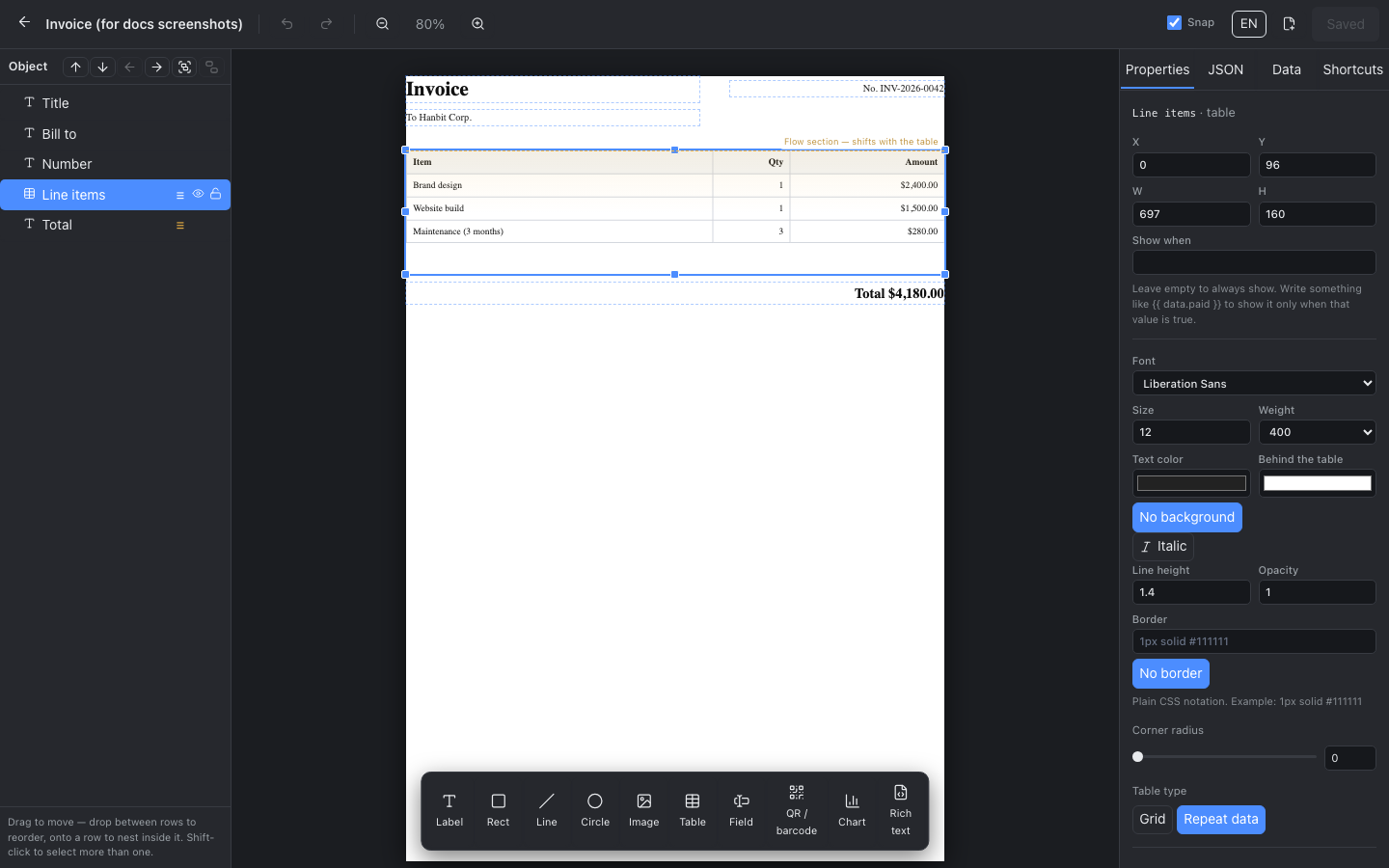
At the top are position and size (X, Y, W, H). The unit is px at 96dpi — A4 is 794 by 1123 — and the origin is inside the page margin. Set the height to 0 and the object grows to fit its content.
Leave "show when" empty and the object always appears. Write something like {{ data.paid }} and it appears only when that value is true — this is how you avoid leaving a blank line where a value is missing.
Below that is the text style: font, size, weight, italic, colour, background, horizontal and vertical alignment, line height, opacity, border and corner radius. For anything that might contain Korean, Chinese or Japanese, choose "Noto Sans CJK KR" — a Latin-only font drops those characters entirely.
Styles are shared between objects. When you edit a shared style we move this object onto a copy, so everything else that used it stays as it was. You can edit freely.
What comes next depends on the kind: an image has a file picker, a table has rows, columns and cell editing, a field has its kind and name, a code has the value to encode, a chart has an array path and two expressions.
Putting data in
Write {{ data.title }} in a label and the value lands there. The moment you write it, that path appears as a chip in the Data tab and sample data is generated for the preview — values have to be present before you can see wrapping and overflow.
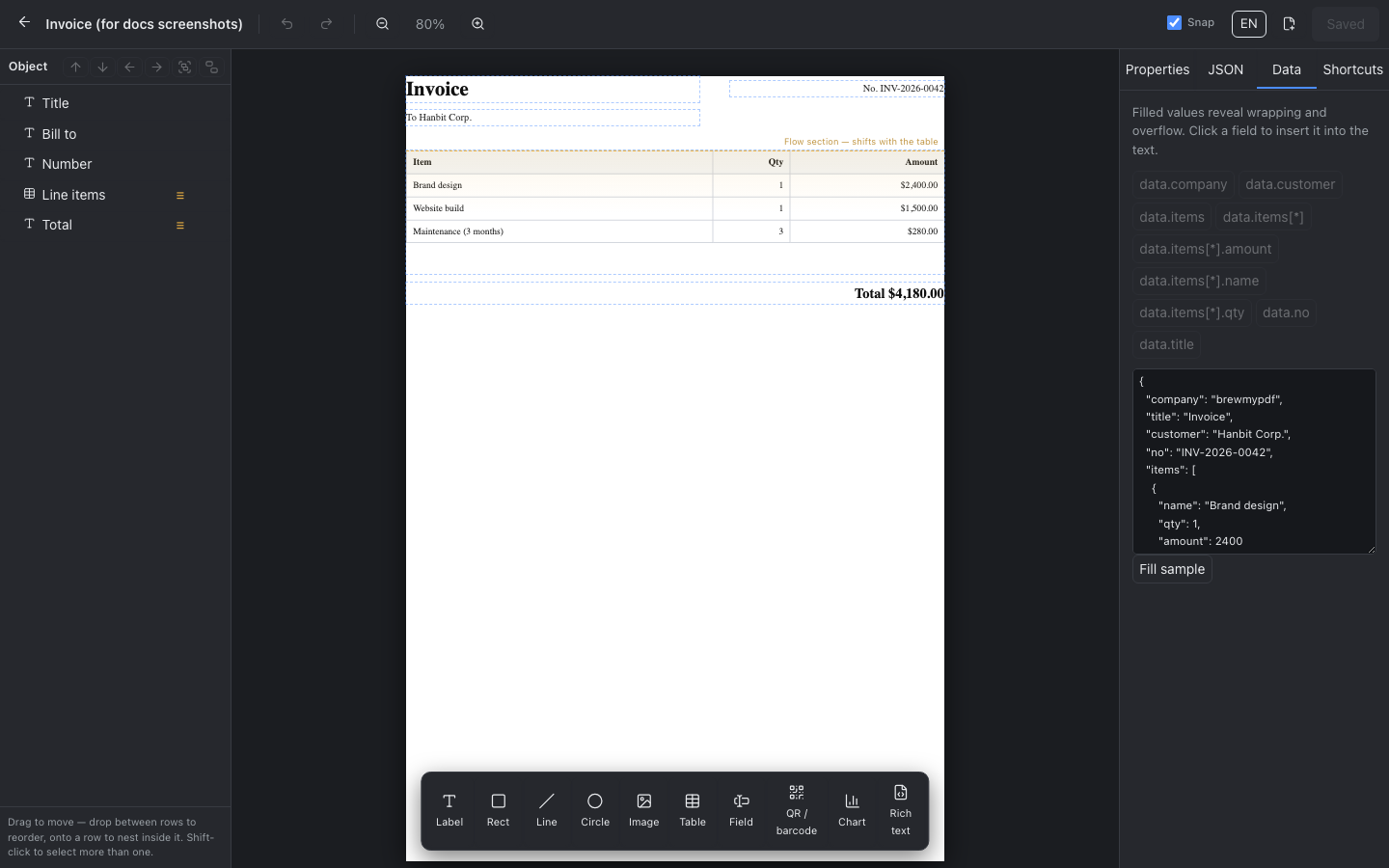
Press a chip in the Data tab and the path is inserted at the end of the selected label. Chips are only active while a label is selected.
Edit the JSON box in the same tab to preview with your own values. That data is for preview only and is not saved — real values travel as data in the API request.
Expressions can call functions. For an amount, {{ format(data.total, "currency", "USD", "en-US") }} renders as $12,000. The full list of functions is in the expressions section of the schema reference.
Building a table
There are two kinds. A hand-built grid is one where you type into each cell; a repeating table is one where an array produces the rows. Switch between them at the top of the table properties — column widths and counts survive the switch.
In a hand-built grid you click a cell on the canvas to select it. Each cell can have its own text, background, alignment, padding and border, and can be merged with the cell to its right or below. The first row starts as a header row, so the header background colour is visible straight away.
In a repeating table you set the array path (say data.items) and the columns. Each column has a heading and a cell template, and inside that template item is the current row — write it as {{ item.name }}.
Padding can be set for the whole table and per cell. Select a cell and the whole-table padding is hidden so only that cell is shown — side by side, there is no telling which one you are editing. Vertical and horizontal are separate values; press the link in the middle to move both together.
If rows grow and the table has to push what is below it, those objects need to be in the flow region. See "Tables that grow" in the schema reference.
Repeating a whole section
Give a rectangle a repeat setting and everything inside it is drawn once per array item. Use it for the repetition a table cannot express — a summary per company, a card per person.
Set the array path and the name for the current item. Name it co and you write {{ co.name }} inside. You can also start each item on a new page, or keep one copy from being split across a page break.
Only the first copy is editable on screen. The other copies are made by your data, so there is nothing there to edit.
Fields people fill in
A field is an empty box the recipient fills in after opening the PDF. We do not print a value into it — a person types into it in their viewer. That is why it does not appear in the Data tab and why adding JSON draws nothing.
To print a value, use a label with {{ data.x }}, not a field. Confusing the two is the most common misunderstanding about this feature.
On screen it is an empty box with a border, because the real appearance is drawn by the PDF viewer. So do draw the border — printed paper has no viewer, and without a line there is nothing to show where to write.
Preview, save, export
The canvas is the preview. It is drawn on your screen without starting a browser on our side, so it costs nothing.
Saving creates a new version. A saved template can be called from the API by template_id, so you can change how the document looks without touching the code that calls us.
The PDF button renders a real PDF with the current data and downloads it. That is a real render and counts as one against your monthly quota.
Keyboard shortcuts
- ← Move left 1px (Shift 10px)
- → Move right 1px (Shift 10px)
- ↑ Move up 1px (Shift 10px)
- ↓ Move down 1px (Shift 10px)
- Delete Delete
- Backspace Delete
- ⌘/Ctrl D Duplicate
- ⌘/Ctrl Z Undo
- ⌘/Ctrl ⇧ Z Redo
- ⌘/Ctrl ] Bring to front
- ⌘/Ctrl [ Send to back
- ⌘/Ctrl G Group
- ⌘/Ctrl ⇧ G Ungroup
- ⌘/Ctrl A Select all
- Esc Deselect
Undo holds 30 steps. Typing does not push a step per character — one step is kept when you finish editing a value.